 Introduction
Let’s face it, B2B sales is a constant challenge. You pound out cold emails, try to break through digital noise, and sometimes wonder if anyone’s actually listening.
That’s where LinkedIn Sales Navigator, when used as intended, quietly becomes a game-changer. Far more than a fancy search upgrade, it’s an engine for authentic connections, sharp targeting, and long-lasting client relationships. If you want to unlock new levels of outreach and close more deals in 2025 and beyond, this guide is for you.
In the following sections, you’ll find a conversational, hands-on roadmap that covers everything from setting up your account for success and building high-impact lead lists to crafting irresistible outreach and capitalizing on data-driven insights. Whether you’re just starting out, or a seasoned pro ready to refine your strategy, you’ll walk away with clear, practical tactics to make Sales Navigator the heartbeat of your sales efforts.
What Is LinkedIn Sales Navigator?
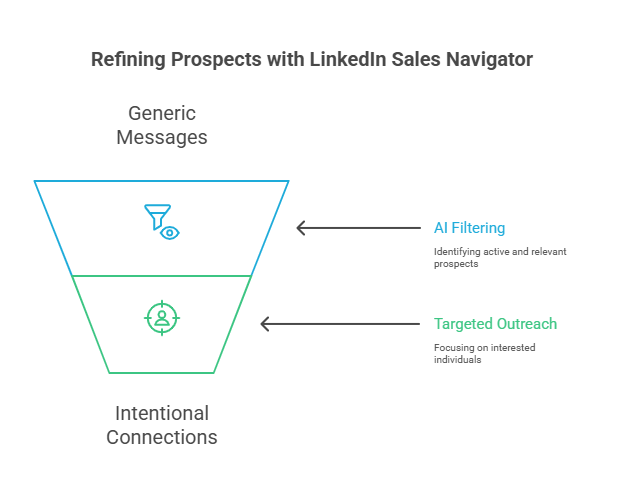
Think of LinkedIn Sales Navigator as your sales command center, a dynamic platform that transforms the way you prospect. Instead of sending hundreds of generic messages into the void, Sales Navigator helps you cut through the junk and connect directly with the people who matter most.
No more guessing who might be interested. The tool’s AI and sophisticated filters bring you prospects who actually want to hear what you have to say, flagging those active in your space or companies on the move. With Sales Navigator, every outreach becomes an intentional step, not a shot in the dark.
Here’s a scenario:
Suppose you offer marketing automation services for tech firms in the GTA. Instead of sifting through endless irrelevant contacts, Sales Navigator lets you dial in: tech companies, in Oakville, under 200 employees, marketing director title. Suddenly, you’re looking at a short list of real prospects, decision-makers who fit your ideal client profile.
Pro Tip: The more precise your filters, the better the results. Sales Navigator isn’t about more contacts; it’s about the right contacts. You can learn more about LinkedIn Sales Navigator here: https://donemaker.com/the-sales-navigator-guide-for-linkedin-outreach/
Core Features and Updates for 2025
Sales Navigator constantly evolves, and the 2025 upgrades are all about productivity, clarity, and integration. Here are some highlights:
- Advanced Search Filters: Quickly target leads based on posted content keywords, company growth, job changes, and skills. This means your searches are aligned with both skills and intent, no more “spray and pray.”
- AI-Powered Suggestions: The platform recommends leads and accounts that fit your closing history and current ICP, surfacing overlooked opportunities while you’re focused elsewhere.
- Real-Time Alerts: Get instant notifications for events like a target’s promotion or a company’s new funding round, so you reach out exactly when people are most receptive.
- Unlimited Searches: Prospect day or night, no arbitrary search limits.
- Enhanced CRM Integration: It’s now easier than ever to link with Salesforce, HubSpot, or Microsoft Dynamics 365, keeping your pipeline synced and error-free across platforms.
Case in Point:
Let’s say you’ve just closed a SaaS deal with a Toronto fintech firm. The updated AI might automatically suggest similar high-growth startups in Waterloo or Montreal actively hiring for growth roles, prospects you hadn’t considered, but that fit your model perfectly.
Setting Up for Success
Success with Sales Navigator doesn’t happen by accident. It begins with intentional setup and a system that’s tailored to your workflow:
- Pick the Right Subscription: Not all features are created equal. Know whether the Core, Advanced, or Advanced Plus version best suits your volume, integration, and team collaboration needs.
- Polish Your Profile: Your profile is your digital storefront. Use a clean, professional headshot and a headline that speaks to your ideal client’s problems.
- Define Your Ideal Customer Profile (ICP): Go beyond demographics. Specify industries, company headcount, titles, and pain points. If you’re seeing results in SaaS and finance, double down on those before branching out.
- Systemize Your Prospecting: Load up strategic filters, create and name your lists (e.g., “GTA HR Directors” or “Growth-Stage Startups”), and set reminders for daily prospecting so you never fall behind.
Best Practice: Revisit and refine your ICP every quarter. Trends change and so should your targeting.
Lead Generation Best Practices
With your house in order, it’s time to feed your pipeline with high-quality leads, and to nurture them the right way.
- Advanced Filters: Avoid surface-level searches. Drill down by team size, niche role, or even recent content (“posted about digital marketing in past 30 days”) to reveal new, relevant contacts.
- Automated Alerts: Turn on new-lead notifications so you’re among the first to welcome a prospect to their new role or congratulate them on company news.
- Custom Lead Lists: Maintain lists for every category relevant to your business. Segment by product line or buyer’s journey stage for hyper-targeted outreach. A cold lead list and a “hot – engaged” list should rarely overlap.
- Data Hygiene: Purge your lists frequently. Remove stale or unresponsive leads, and always note your last interaction and its context.
Example:
A consultant in Oakville keeps a “SaaS CMOs – Ontario” list. Weekly review helps identify who engaged, who ignored follow-ups, and who showed buying signals (new hires, job posts, or key content shares).
Tip: Don’t keep chasing the same cold leads, track inactivity and move on!
Harnessing Boolean Search
Boolean search is one of Sales Navigator’s most underrated tools. Using AND, OR, NOT, and parentheses, you can build surgical searches.
- Exact Titles: “Director of Operations”
- Role Alternatives: marketing OR business development
- Exclusions: VP Sales NOT \”Junior\”
- Complex Filters: (finance OR fintech) AND (Toronto OR Oakville) NOT \”intern\”
A saved swipe file of proven Boolean strings saves time and boosts accuracy across multiple campaigns.
Building and Managing Lead Lists
A good lead list isn’t just a collection of names, it’s your priority map. Treat it like gold:
- Descriptive Naming: “Ontario SaaS Decision Makers Q3” is better than “Leads 7/20.”
- Segmentation: Divide by territory, product, industry, or stage in your process.
- Automated Alerts: Never miss when a lead posts new content, changes jobs, or engages with your content.
- Frequent Refresh: Each quarter, clean your lists. Drop unresponsive leads, add new ones fitting your sharpened ICP.
Tip: Segment by sales cycle (early nurturing, needs analysis, proposal sent) and align your messaging to where each group is mentally. You can learn more about LinkedIn Sales Navigator strategies here: https://donemaker.com/manual-vs-automated-linkedin-outreach-the-2025-guide/
Making Outreach Feel Human (and Get Replies)
Nobody wants to be “sold to.” Approach outreach as the genuine start of a relationship:
- Personalization Is Everything: Reference admissions, posts, or shared connections.
- Engagement Before Pitch: Like and comment on content first to become recognizable before your DM lands.
- Multi-Touch Works: Connection request, then a thoughtful message, then possibly a useful article or case study as a third touch before suggesting a meeting.
Result:
A sales strategist reports 3x more meetings booked after adopting this cadence versus one-and-done messages.
Data Analytics: Sharpening Your Prospecting
Analytics reveal what your gut alone never could:
- Monitor Engagement: Which contacts read and reply?
- Spot Trends: Who is suddenly active, new funding, lots of new hires?
- Refine Lists: Use this feedback to double down on segments performing well instead of persisting everywhere.
Review engagement and activity at least once a week, Sales Navigator makes this visual with dashboards and integration into top CRMs.
Value Propositions That Actually Get Read
Forget “let me tell you about our company…” Instead:
- Lead with a Hook: Name a challenge they recently posted about.
- Brief Value Statement: Tie your offer directly to their goals.
- Social Proof: Mention a measurable win for a similar business.
- Simple CTA: Suggest an informal 15-minute chat.
Example:
“Hi Jamie, noticed your company just expanded the implementation team. We helped [PeerCompany] cut onboarding time 30%. Up for a quick call next week?”
Optimizing Your Workflow
Sales Navigator shines when used with discipline:
- Schedule Prospecting Time: Block 30–45 minutes daily for research and outreach.
- Automate Where It Makes Sense: Use Sales Navigator’s notifications and CRM syncing, but write your own outreach messages.
- Balance Scale and Personal Touch: Bulk actions are efficient, but first messages should always be tailored.
Technology Stack: Integrate with Engagement platforms like Outreach or SalesLoft for seamless process management.
Leveraging Rich Media and Video
Video breaks through inbox fatigue and makes you memorable:
- Short, Personalized Videos: Say hello, reference something you noticed, and explain value in 40–90 seconds.
- Demo Videos: Pair with later-stage outreach; show, don’t just tell.
- Invitations to Events: If hosting webinars, turn leads into participants before they become clients.
Pro Tip: Use analytics to track opens and engagement on rich media messages. Adapt your approach as you learn what gets watched and replied to.
Cultivating Long-Term Relationships
Sales success is rarely overnight, focus on relationships as your real asset:
- Stay Top of Mind: Comment on posts, congratulate achievements, and send resources relevant to their current initiatives.
- Don’t Push: Regular, value-driven touches work better than pressure tactics.
- Be Patient: Buying cycles are often long. Consistent, helpful presence inevitably wins.
Case Study:
One Oakville-based consultant converted a major account after nine months of authentic, regular check-ins, no hard sell, just helpful expertise.
Power of Team Collaboration
Sales Navigator shines brightest as a team sport:
- Shared Lists and Insights: Enable collective tracking across verticals or territories.
- Unified Messaging Playbooks: Keep your pitch and approach consistent while allowing for personal adaptation.
- Leaderboards & Wins: Celebrate progress as a group; recognition fuels performance.
- Peer Learning: Encourage sharing of what’s clicking (and what’s not).
Staying Ahead of the LinkedIn Curve
LinkedIn often updates features and best practices:
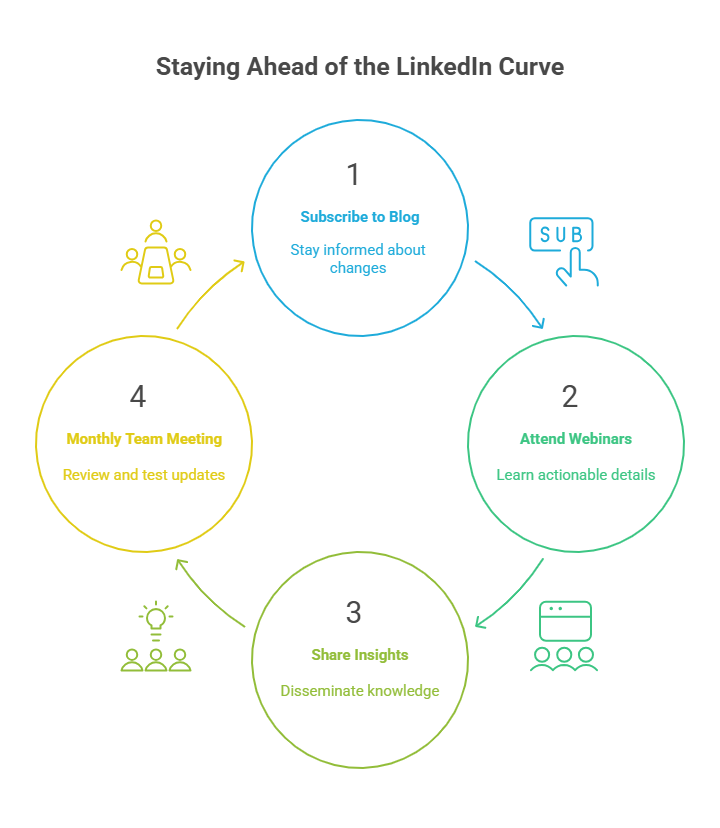
- Subscribe to LinkedIn’s Sales Solutions Blog: Get updates on algorithm shifts, new search or messaging capabilities, and more.
- Attend Webinars: Fastest way to absorb updates in actionable detail.
- Share Insights: Encourage everyone on your team to “report back” after training or webinars.
Suggestion: Monthly team meeting to review and test the newest tools, changing quickly with the platform is a competitive advantage.
Final Recommendations
- Use It Daily: You’ll quickly spot patterns, follow up efficiently, and build the habit needed for big results.
- Adapt Based on Results: Check your analytics. Revise playbooks, filters, and templates often.
- Personalize, Always: No one wants to be spammed. Be real, succinct, and custom in every message.
- Pair Content With Outreach: Show thought leadership, then connect with those interacting.
- Sharpen Skills: Block time for training and LinkedIn learning. Sales Navigator’s best users are its best students.
- Stay Human: Touch base, offer value, and be genuinely curious about prospects.
When you commit to this approach, you’ll close more deals, not because you hustled harder, but because you worked smarter and built trust that
lasts.